

For HubSpot admins and marketing, sales and service leaders · Following HubSpot's November 17, 2026 announcement
Can you use HubSpot from ChatGPT or Claude? What's included, what costs more and what to set up first.
HubSpot's "headless" update lets AI tools look things up and update records in your portal through connectors. Here's what's included with your seat, what can cost more, and what to set up before anyone connects.
Your team probably already asks an AI tool for help with an email draft or a meeting summary. Then someone opens HubSpot in another tab to check the deal, copy the notes and update the record.
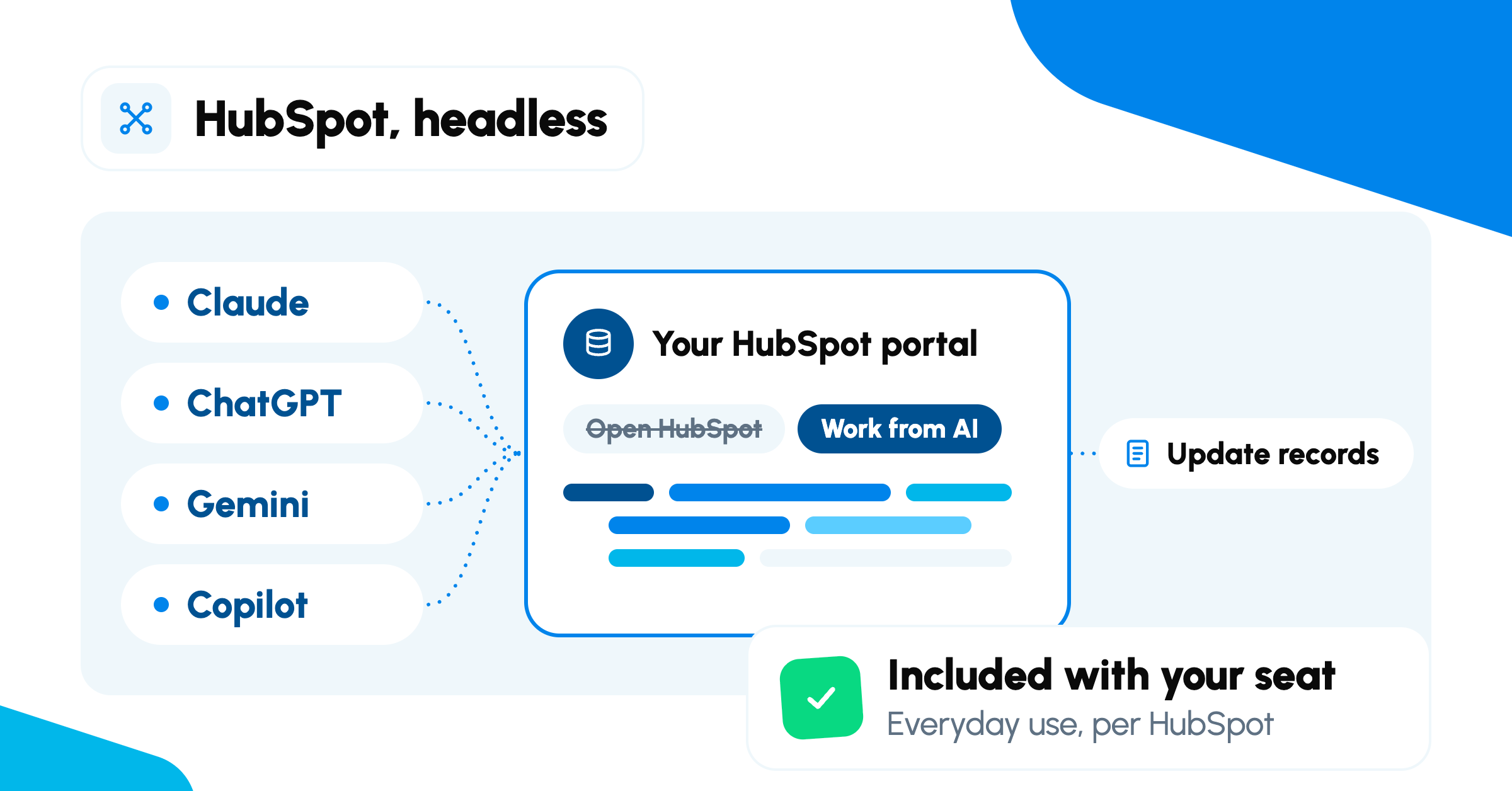
That second step is what HubSpot just changed. Your team can now ask Claude, ChatGPT, Gemini or Microsoft Copilot about your HubSpot data and act on it from there, without opening HubSpot itself. HubSpot calls this going "headless."
The short answer: nothing changes unless someone connects a tool. HubSpot says everyday use is included with the seats you already pay for. If your team does plan to connect one, three decisions come first, and permissions is the first of them.
In this post
Key takeaways
- Nothing changes unless someone on your team connects an AI tool.
- HubSpot says simple, everyday tasks are included with your seat. Going past what your seat includes, and AI agents working at scale, run on HubSpot Credits.
- Each AI tool needs its own account, and the requirements differ by tool.
- Decide what the AI can see and change before you pick the tool.
What does "headless" mean for HubSpot?
"Headless" means your team can work with HubSpot's data and tools from outside HubSpot's own screens. HubSpot now has connectors for Claude, ChatGPT, Gemini and Microsoft Copilot. Once one is connected, someone on your team can ask a question like "Which deals haven't moved in 30 days?" and get the answer in the AI tool they already use.
The connectors can look things up, and create or update records, but only within the permissions you set. HubSpot is still where your data and your rules live. The AI tool is a new way in.
What's included with your seat, and what can cost more?
HubSpot says simple, everyday tasks from your AI tool are included with the seats you already pay for. HubSpot's announcement gives three examples: a sales rep summarizing open deals, a customer success manager prepping for a renewal call, and a marketer launching a campaign. Other apps and agents you connect to HubSpot count toward the connection limits your plan already includes: the number of connections and requests it allows.
Included with your seat
Simple, everyday tasks from your AI tool, like summarizing open deals, prepping for a renewal call or launching a campaign. HubSpot says this isn't an extra charge.
What can cost more
Going past what your seat includes, and AI agents (software that takes actions for you) doing work at scale, like enriching records or personalizing outreach.
That second column runs on HubSpot Credits, HubSpot's usage units for AI actions, and can also need extra connection capacity.
Worth noting: if you use Credits, HubSpot's Credits page says you can set a limit for each feature, get alerts as you approach it, and pause a feature at any time.
What does each AI tool need?
Each tool needs its own account, and the requirements differ.
| Tool | What you need | HubSpot's setup guide |
|---|---|---|
| Claude | A paid Claude plan: Pro, Max, Team or Enterprise | Set up the connector for Claude |
| ChatGPT | An OpenAI account | Set up the connector for ChatGPT |
| Gemini | Google Workspace Business Standard, Business Plus or Enterprise, with Gemini Alpha turned on | Set up the connector for Gemini |
| Microsoft Copilot | A Microsoft 365 Copilot license, or the Copilot Chat add-on with an eligible Microsoft 365 license; a Microsoft 365 admin adds the HubSpot Agent | Set up the HubSpot Agent for Copilot |
What can the AI see in your portal?
The AI tool sees only what you allow. A Super Admin, the HubSpot user with full account access, approves the connector and chooses what data it can reach. Each person then connects their own account and sees only what their own HubSpot permissions already allow.
If your portal uses HubSpot's Sensitive Data settings, the AI tool can only read that data if a Super Admin turns it on. HubSpot's guide to AI connector access to Sensitive Data explains which tools can see what. Check your AI provider's data terms before you connect, too.
What we see when teams connect AI to HubSpot
Most teams we work with don't start with AI. They start with a portal someone else set up, reports that don't match what sales sees, and numbers pulled into a spreadsheet to double-check. Connecting an AI tool doesn't change any of that. It just makes the data easier to ask about.
"Headless sounds like HubSpot matters less now. It's the opposite. When your team works from Claude or Copilot, they stop looking at HubSpot's screens, so they stop noticing what's off in the data. The AI won't notice either. It will answer confidently from whatever is there."
Lindsey Flores, Content Marketer, Bluleadz
What should you do before you connect?
1. Decide what the AI can see and change.
Permissions come first, because what it can see decides what it can safely change. As Lindsey puts it: "Connecting the tool takes a few minutes. The real decision is what you're comfortable letting AI change on someone's behalf, and that's a conversation for your team before it's a setting in your portal."
2. Pick the one tool your team already uses.
Starting with one keeps permissions, training and support simple.
3. Make sure your data is ready to trust.
AI answers from what's in your portal. If the numbers in your reports don't match reality, the AI's answers won't either.
Myth Connecting an AI tool will clean up messy HubSpot data.
Reality The AI works from the data you already have, so clean data comes first.
What hasn't HubSpot announced yet?
Three details are still open: how much use a seat includes before Credits apply, how many Credits each action uses, and when HubSpot's new tools for managing AI agents arrive. HubSpot's announcement is the place to watch for those details.
Is your portal ready for AI to work in it?
Our free HubSpot portal audit gives you a readout of what's working, where data is duplicated and what to fix first, so whatever your team connects is working from data you can trust.
Get your free portal auditSources (last checked November 2026)
- HubSpot is headless. Here's how we'll price it · HubSpot Company News (pricing announcement, Nov 17, 2026)
- HubSpot Credits · HubSpot product page (Credit limits, alerts and pausing)
- Set up and use the HubSpot connector for Claude · HubSpot Knowledge Base (Claude setup and requirements)
- Set up and use the HubSpot connector for ChatGPT · HubSpot Knowledge Base (ChatGPT setup and Super Admin approval)
- Set up and use the HubSpot connector for Gemini · HubSpot Knowledge Base (Gemini setup and Google Workspace requirements)
- Set up and use the HubSpot Agent for Copilot · HubSpot Knowledge Base (Copilot setup and Microsoft 365 requirements)
- Configure AI connector access to Sensitive Data and engagements · HubSpot Knowledge Base (what each AI tool can see in Sensitive Data)
Bluleadz
Comments