
A CRM ready for a new program's first 250 clients
The challenge they faced
The client was launching a new program and needed to establish a functional CRM foundation from the ground up. The team faced the immediate challenge of organizing roughly 250 initial clients, tracking interactions, and supporting day-to-day operations starting July 1. Without a defined data structure, they risked inconsistency and duplicate records across contacts, accounts, districts, and roles.
The client turned to Bluleadz to strategize and build out a CRM implementation that would provide the leadership, roadmap, and expertise needed to move forward. The project required defining the right data model, establishing core CRM fields, and creating a clean process for importing and managing records before the program launch date.
The strategy we mapped
The approach prioritized defining the data model and CRM structure before building automations or reports. The team started with discovery sessions to map the service workflow, then moved to configuring core properties, setting up contact and company imports, and establishing a clean process for handling districts, roles, and client records. Because the program launch was fixed at July 1, the strategy front-loaded data architecture work so that everything downstream–automations, playbooks, reporting–could build on a stable foundation without rework.
Early in the engagement, it became clear that the current HubSpot tier lacked the Playbooks functionality needed to capture and report on quarterly check-in data. The team secured an upgrade path to Service Hub Enterprise, which unlocked property-writing playbooks and workflow-driven sequences. This licensing decision shaped the build sequence: properties first, then playbooks and automations. The imports of initial schools and contacts proceeded in parallel, using record IDs as safe update keys for future batches.
By mid-August, the discovery work had revealed that quarterly check-ins, renewals, and internal reminders were the core operational rhythm. The team designed separate playbooks for pre-session prep, during-session notes, and post-session reflection to match how staff actually worked, then built quarterly variants for Q1 through Q4. Simultaneously, a support ticket pipeline was configured with automated alerts to prevent orphaned requests. This phased approach ensured that critical data capture and notification systems were live before the team transitioned to managing the new program at scale.
The solutions we executed
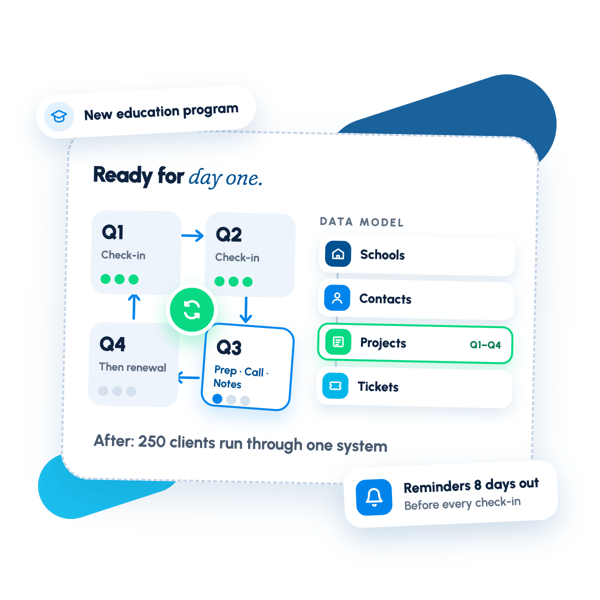
We built a custom data model centered on Schools, Contacts, Projects, and Tickets. Schools records captured essential context including School ID as a unique identifier, time zone, and domain. Contacts were imported and associated to their Schools, with properties for district and subset tagging to enable slicing across multi-district groups. Projects served as the primary engagement container, tracking quarterly check-ins (Q1 through Q4), onboarding, and renewal cycles with stage-based workflows.
We created roughly 90 custom properties to power quarterly check-ins and onboarding workflows, mapping questions to data fields for reporting and segmentation. These included engagement assessment scales (shifting to numeric 1–5 with contextual reason fields), session dates and formats, improvement partner assignments, and a renewed-contract flag to distinguish returning schools. We then built property-writing playbooks–three per quarter (pre-session prep, during-session call, post-session reflection)–that guided staff through structured data capture while writing answers to properties for dashboards and analysis.
We configured workflows and sequences to automate internal reminders and client communications. Internal email reminders sent 8 days before each quarterly check-in date to ensure preparation. A separate set of workflows handled renewal routing: projects completing Q4 triggered either a renewal sequence (moving to new onboarding projects with full activity history) or closure. We also built a help desk pipeline with automated alerts–immediate notification for new unassigned tickets and a 24-hour follow-up if still unassigned.
We imported an initial cohort of schools and contacts using a repeatable mapping template that teams could reuse for future state-level batches, establishing School ID as the safe deduplication key for incremental updates. A welcome-email workflow was built but held in draft pending copy and renewal logic; it used exclusion and branching to avoid re-onboarding returning schools with tone-deaf messaging.
We delivered a dashboard and reporting foundation with views for projects by stage, upcoming and past check-in dates, completion metrics, activity summaries by user, and ticket volume and SLA status. We also flagged a report to identify records with no logged notes in a given quarter, helping leadership spot gaps in playbook compliance and drive internal adoption.
We trained the team to manage playbooks, build additional quarterly variants via cloning, and govern data quality by requiring certain properties (e.g., engagement assessments) while allowing qualitative notes to remain flexible. We also configured basic permissions and a simplified user interface for improvement partners, then transitioned support to the team with clear escalation paths: our team handled custom builds and workflow questions, while HubSpot Support addressed platform issues.
What changed after the engagement.
The client now has a functional CRM foundation with clean data, structured quarterly workflows, and automated reminders in place to support operations at scale. A custom data model centered on Schools, Contacts, Projects, and Tickets enables consistent tracking of onboarding, quarterly check-ins, renewals, and support requests. Roughly 90 custom properties power playbooks and reporting, while workflows automate internal reminders 8 days before check-ins, renewal routing, and ticket alerts. The team can now execute day-to-day operations through one dependable system instead of fragmented spreadsheets and manual processes.
Want results like these?
Tell us where your revenue engine is stuck — we'll map the fix in one call.