
Candidate pipeline out of the spreadsheet
The challenge they faced
A veterinary practice management company was managing talent acquisition through a complex, multi-tab Excel spreadsheet. The team tracked requisitions, candidates, recruiter assignments, interview notes, pay rates, and offer statuses in a system that made it difficult to search for and retrieve notes or previous candidate interactions. Manual processes dominated the workflow: applicants were assigned to recruiters by hand based on geography, automation was minimal, and the existing applicant tracking system lacked the necessary lead management and pipeline functionality. The team needed a way to consolidate recruiting data, reduce spreadsheet work, and provide visibility into hiring metrics.
The strategy we mapped
The team started by consolidating what data the talent acquisition and university relations groups needed to track in HubSpot, then locked down permissions and property architecture to keep candidate information separate from the client's other contact types. This sequencing–agreeing on scope and data governance before building pipelines–prevented rework and ensured each team could search and retrieve candidate notes without exposing sensitive hiring data across departments. The project imported historical candidate records from spreadsheets and set up a Projects pipeline to track applications per role per location, with automatic note sync from project records to contact records so that all communications lived in one searchable place. Late-stage discoveries about data inconsistencies in state abbreviations and missing email addresses shifted some cleanup work into the office hours phase, but the core pipeline and automation were solid enough to hand off after two formal training sessions.
The solutions we executed
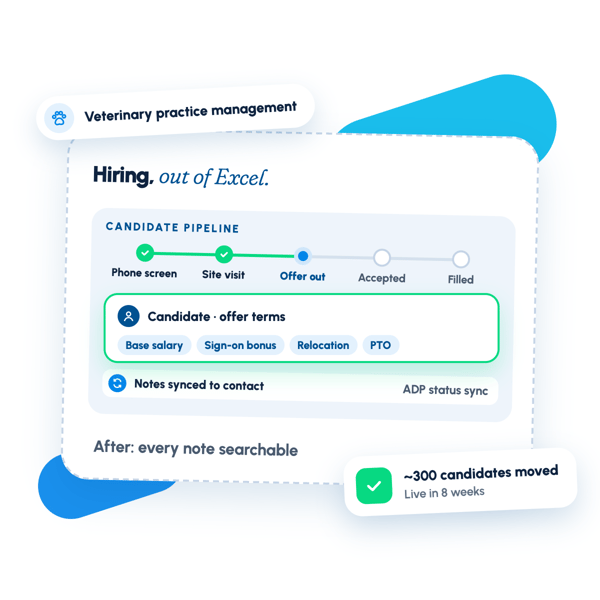
The talent acquisition pipeline sits on HubSpot's Projects object, with one project created per candidate per location. Each project moves through stages–Phone Screen, Site Visit, Offer Extended, Offer Accepted, Filled–and is linked to a Contact record. A workflow automatically syncs notes, calls, emails, and task activity from a project to its associated contact, creating a unified communication history accessible from either record. This eliminates the manual work of copying notes between spreadsheets and ensures that if a team member is out, the entire hiring history remains visible and searchable to colleagues.
The team set up structured fields for offer details–base salary, hourly rate, production percentage, sign-on bonus, relocation allowance, travel stipend, PTO, and continuing education allowance–so that offer terms can be analyzed and compared without digging through free-text notes. An automated workflow advances candidates through the pipeline when key milestones like a hospital visit date are recorded, reducing missed stage changes. A second workflow captures decline reasons at the Declined Offer stage so the team can measure where in the process candidates are dropping off and adjust sourcing or compensation strategy.
The team migrated approximately 300 historical projects into the pipeline from the recruiting workbook, adding a custom property to track future candidate interest so that promising candidates who are not yet ready to apply can be flagged and scheduled for follow-up via HubSpot tasks rather than personal Outlook reminders. A separate Active List was created for 1099 relief veterinarians, driven by a custom property filter, enabling marketing follow-ups to this segment without manual list maintenance. An integration with the client's ADP system was configured so that candidate status changes in ADP sync to HubSpot, keeping the Projects pipeline current without duplicate data entry.
A dashboard was built to show projects by stage, candidate activity trends, hiring team performance, and primary decline outcomes, giving leadership visibility into which sourcing channels and positions move fastest through the pipeline. Custom views were configured for the team to filter by stage, region, or hiring manager, and views can be saved and reused. Two formal training sessions covered the new workflow, and four post-launch office hours sessions provided hands-on troubleshooting as the team began entering real candidate data and discovered edge cases around offer security protocols and state data standardization.
What changed after the engagement.
The client's talent acquisition team now manages recruitment through a consolidated HubSpot pipeline instead of a fragmented Excel spreadsheet. Approximately 300 historical candidate records were imported and organized into the Projects object, with each project representing one candidate's application at one location. A workflow automatically syncs notes, calls, emails, and task activity from project records to contact records, creating a unified communication history searchable from either record.
Structured offer detail fields–base salary, hourly rate, production percentage, sign-on bonus, relocation allowance, travel stipend, PTO, and continuing education allowance–replace free-text entry, enabling analysis and comparison of compensation trends without manual extraction. An automated workflow advances candidates through the pipeline when key milestones are recorded, reducing missed stage transitions. A separate workflow captures decline reasons at the Declined Offer stage, allowing the team to measure where candidates drop off and adjust sourcing or compensation strategy accordingly.
Leadership now has visibility into hiring metrics through a dashboard that tracks projects by stage, candidate activity trends, hiring team performance, and primary decline outcomes, revealing which sourcing channels and positions move fastest through the pipeline. A custom Active List for 1099 relief veterinarians, driven by a property filter, enables marketing follow-ups to this segment without manual list maintenance. An ADP integration keeps the Projects pipeline current by syncing candidate status changes from ADP to HubSpot, eliminating duplicate data entry. The team operates independently with saved custom views filtered by stage, region, or hiring manager, and scheduled post-launch office hours provided hands-on troubleshooting as real candidate data entry surfaced edge cases around offer security protocols and state data standardization.
Want results like these?
Tell us where your revenue engine is stuck — we'll map the fix in one call.