
Vendor quotes on the deal in one upload
The challenge they faced
The client prices every quote in a third-party configuration system, while its sales reps are moving into HubSpot. Large projects arrive as combined quotes: one HubSpot deal holding several configurations, each a separate deal in the quoting system, such as one per site. Each configuration exports as a spreadsheet of 40 or more line items, too many to enter by hand.
Configurations also arrive at different times. Reps needed to add a new one to an existing deal, or swap in a revised one, without clearing out and re-entering the deal's line items first.
The strategy we mapped
We kept every configuration on one HubSpot deal, as the client wanted, instead of mirroring the quoting system's separate deals. Each configuration becomes a Product Configuration value on its line items, so one deal can hold several sites and the quote can group them. The importer reads the vendor export exactly as it comes out, zero-priced lines and class codes included, so reps never clean up a spreadsheet first.
We first scoped the importer as an interactive website page linked to the deal. Without HubSpot Enterprise, we moved it into a custom CRM card that adds a Line Items Importer tab to every deal, so reps work on the record they are quoting. The card runs in three steps (upload, review, apply), and nothing changes until the rep confirms. Guardrails check the file against its own totals, show the effect on the deal before it runs and flag an existing quote. Every import feeds the combined quote template we built earlier, so configurations and product classes land where the quote expects them.
The solutions we executed
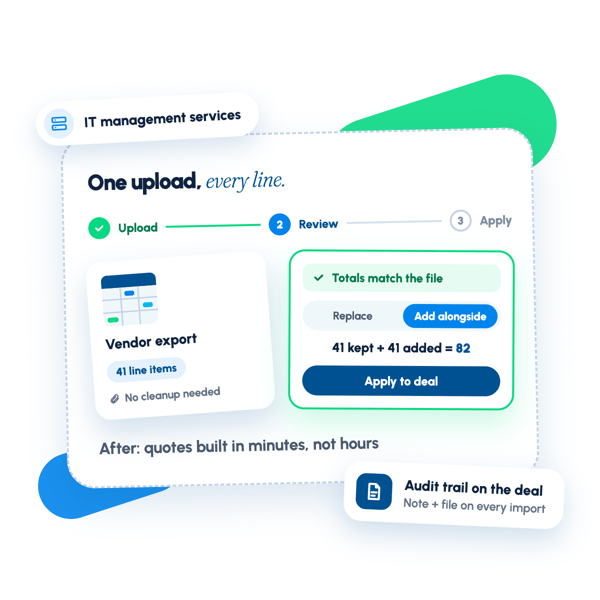
One tab on the deal. The card lives on its own Line Items Importer tab and walks through Upload, Review and Apply. Reps upload the export as it arrives, and the file is also kept in the deal's attachments.
A check before anything changes. The card names the deal and record ID it will change. It confirms that the list price and cost across all lines match the totals printed on the file, and shows the line item count, configurations and list price.
Configuration names. When the sheet has a Product Title column, the configuration name comes through on its own. When it doesn't, the card suggests the quote number and the rep adds to it, such as a site name.
Replace or add alongside. Replace clears the deal and loads the file. Add alongside keeps what is there. Each option shows the math (41 removed + 41 added = 41, or 41 kept + 41 added = 82) and the deal Amount it will set, and Replace lists the line items it will remove.
Quote warning and order. If the deal already has a quote, the card warns that publishing it again copies the quote's own line items back onto the deal. When adding alongside, reps arrange the configurations in the order they should appear on the quote.
Product class mapping. Class codes on the sheet map to the Product Class property: HW to Hardware, SW to Software, SV and IN to Services, ES to Maintenance. HS codes vary, so the card lists those lines and won't apply the file until the rep picks a class for each. A preview shows every line as it will be created, with zero-priced lines kept.
A tracked run. The card shows each step as it runs: note what is on the deal, create the new line items in one batch, check the count and totals, set the quote order to match the sheet row for row, remove the previous line items, update the deal's Amount and add a note. It ends with a summary of what changed.
An audit trail on the deal. The timeline note records the action, the file, the line items added (with list and cost) and removed or kept, the new Amount, the configurations and who ran it. The spreadsheet is attached to the note and listed under the deal's attachments.
Ready for the quote. Each line item carries its SKU, unit price, unit discount, unit cost, Product Configuration and Product Class. The combined quote template groups the lines by configuration and splits each into hardware, software, services and maintenance.
See it in action.
Click through a working version of what we built — the same flow the client's customers use.
What changed after the engagement.
Building a 70-line-item quote, with SKU, unit price, unit discount, unit cost and two custom line item fields (Product Configuration and Product Class) on every line, now takes minutes instead of hours of manual entry and editing. Reps load a vendor configuration onto the deal in one upload, straight from the quoting system's export, with no spreadsheet cleanup.
New configurations stack on the same deal as they arrive, and revised ones replace the old lines without manual deletion. The combined quote groups hardware, software, services and maintenance under each configuration, and each import leaves a timeline note and the source file on the deal. Once lines are on the deal, reps can reprice them in bulk with a custom-coded margin and discount workflow.
Want results like these?
Tell us where your revenue engine is stuck — we'll map the fix in one call.